Add new virtual disk in XEN \"hot\

It is usual that after several years the space forecasts in a virtual machine are exceeded, in many cases because the project for which it has been destined is being a success and requires a larger storage size. What in principle may be a joy, also involves extra effort, since if the machine is in production, and we have more users, it means that we cannot turn off the machine for an hour to perform maintenance tasks. Thanks to XEN we can change the virtual hard disk without having excessive problems

Read more...

SSHFS, mounting directories via ssh

Secure SHell FileSystem (SSHFS) is a file system for Linux (and other operating systems with a FUSE implementation, such as Mac OS X), capable of displaying files on a remote system as if it were just another folder on your computer using secure access.

In this way, a user can work on a series of files on another computer as if it were in local mode. For its operation, only the installation of an SSH server is necessary on the remote machine. Once it is perfectly configured on the local machine, we proceed to the SSHFS installation:

Read more...

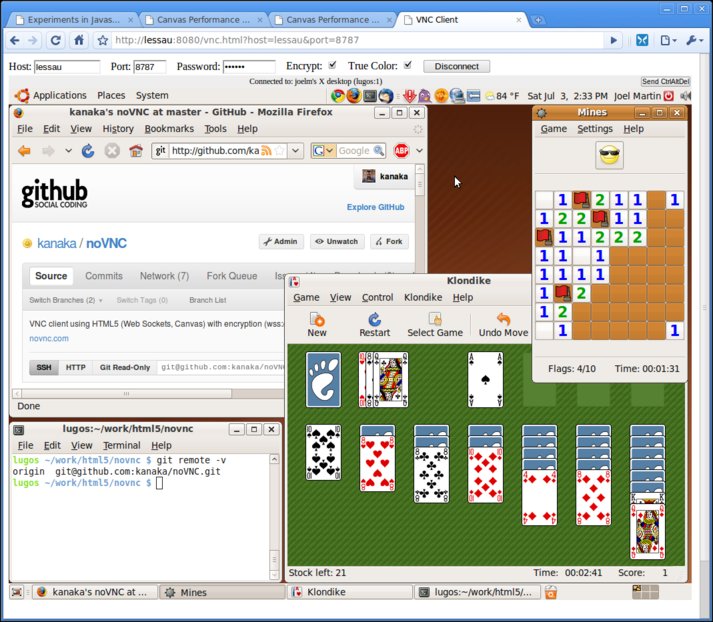
noVNC, HTML5-based VNC client

noVNC is a VNC client implemented using HTML 5 technologies, specifically Canvas and WebSockets (“wss://’ supports encryption). noVNC is licensed under the LGPLv3.

Browser requirements for noVNC

-   HTML5 Canvas: Most browsers have had a lot of development in this regard for quite some time. The last one to join has been Internet Explorer 9 (finally).

-   HTML5 WebSockets: For browsers that have not incorporated WebSockets support, the project includes web-socket-js, a WebSockets emulator with Adobe Flash.

Read more...

Change UID of a user

It may be the case that, for example, in a server migration, you have to concatenate machines, which implies that the users must continue to exist on both servers, but this time on a single machine. This implies that we must change the UID and GID of each of them (at least on one machine) to avoid major problems.

One of the initial trends is to change the identifiers directly in the /etc/passwd files or in the /etc/group, a serious mistake, since for example the files in which said user has permission will be lost, leaving the previous identifier.

Read more...

Backtrack 5 course, auditing the world

omhe_Logo

Backtrack is a LiveCD distribution, as well as an installable one, that compiles a complete range of utilities to audit various systems. Although it is well known for being prepared for auditing Wi-Fi networks, it is more interesting to review the rest of the tools it offers us to work with all technologies. Taking advantage of the fact that Backtrack 5 R1 has just been published, I present to you the Mexican Organization of Ethical Hackers that has published a simple course to get started in understanding this tool, very basic, but useful for those who want to enter this world.

Read more...

Send mail from shell script

There are thousands of ways to send an email from the Linux shell, but in this case we are going to explain how to do it using msmtp, something more complex than other ways, but useful in certain situations.

To do this we edit the msmtp file

#nano ~/.msmtprc

We are going to configure a GMail account, although it is also possible to do this with our SMTP server. We copy the following text

Read more...

Backup of XEN machines with LVM

When we find ourselves in a situation of servers in production, it is advisable from time to time to perform a complete backup of the machine on certain specific servers, or we simply want to move said machine to another system but we cannot do it in a traditional way. Next we are going to see a technique in which it is not necessary to turn off the virtual machine, and continue providing service without noticing excessive deterioration of the service, or its crash.

Read more...

PgAgent, installation and configuration

PgAgent, in plain words, is like a “cron” but specifically for Postgres databases and a much more powerful level, a great help for carrying out scheduled jobs.

To install pgagent, for example from Debian, just run: apt-get install pgagent

Once on the computer we proceed to the real task, its configuration. First we have to make sure that we have the plpgsql language installed:

CREATE TRUSTED PROCEDURAL LANGUAGE 'plpgsql' HANDLER plpgsql_call_handler VALIDATOR plpgsql_validator;

Read more...

Resize Xen partition with LVM

It is not strange that when sizing a virtual machine we have certain project specifications which change over time, and the need to increase disk space may be essential.

At first glance it may seem like a tedious task and you may start to tremble at the possible loss of data, but after a good prayer, a strong coffee and a win these fears disappear, leaving behind some simple steps described below.

Read more...

Authenticate via SSH without password

Recovering old and very useful tutorials for those of us who play with servers, we are going to review how to create SSH keys so as not to have to write the password when authenticating against the server.

First we must be clear about what we are going to do, since applying this configuration would imply that a malicious user with access to your console could access the remote machine. It is not advisable to do this with the root user, but rather with one with few privileges to avoid scares.

Read more...

Beta 71-669 TS: Windows Server 2008 R2, Desktop Virtualization

     Are you an expert in desktop virtualization? Well, you are in luck, since the beta has been opened to be able to certify you under Windows Server 2008 R2.

71-669 TS: Windows ® Server 2008 R2, Desktop Virtualization 
http://www.microsoft.com/learning/en/us/exam.aspx?ID=70-669

     Access to this exam is limited, since it is BETA, and will serve to improve the experience for future certificates.  To do this you have to use your “MSL SME” in Connect (http://connect.microsoft.com/site862  ), create your “SME profile”, or update it to be sure that one of your interests is Virtualization. Next March 1st at 9 a.m. on the east coast of the United States, you will be able to register and participate in this exam.

Read more...

Set up a proxy with SSH and SOCK5

    Since several colleagues have told me about it lately, I have decided to expand an old post, and leave, as a reminder, this post on how to leave via an internet connection other than the one you are using on your computer.

Basically what we are going to do is the following:

OurPC ==> (Internet Provider X) ==> SSH SERVER ==> (Internet Provider Y)

The idea is, if for example we have a blocked connection, or we want to load a website from the office as if we were a client, or simply change IP. What we must do is generate a tunnel which takes us directly to the exit point and from local connect via proxy to this tunnel.

Read more...

Windows Server 2008 Book

After my last book written, I return to the fray with a new success that every beginner in systems administration should have (which is not because it is mine, ;) ).   This book is aimed at both users with experience working with server environments and those who want to get started in the field of systems administration by managing various types of services.

The chapters have been structured to facilitate the study and based on the necessary steps that are usually taken in the assembly of all services for a company from its inception. I hope you like it, by the way, I promise a beer to everyone who shows me their purchase!! that is cheap!!

Read more...

SSH tunnels through a firewall

Sometimes it is necessary for us to bypass a firewall to perform certain tasks. Usually because we have left work pending and we intend to get home and continue with the task. Unfortunately, today not all companies agree with teleworking, nor do they have their systems prepared for it, this means that we have to find tricks to access our machine.

First, a hole must be opened to establish communications from a PC inside the firewall to another PC, with an ssh server,

Read more...

Configure two or more Web Servers on the same IP

Depending on the network topology necessary in each situation, it is possible to need a proxy or an HTTP request balancer, it is not necessary to have millions of requests for such a need, it can simply be because there are several web servers (IIS, Apache, Lighthttpd, …) and the intention is to hide this topology from the client by launching everything on port 80.

To do this we will configure a server that receives the requests and redirects them to the corresponding computer. First from Apache 2 the proxy module must be enabled, in Debian for example it would be:

Read more...

The server crash effect

More than a technical article, I want to tell you a reflection. I am going to present to you the real effect of a portal falling for a few days.

In the technological age, we have a great ability to adapt to changes, especially if our favorite portal goes down in order to remain informed. Obviously, a disconnection of several days (even if you put a video by David Cervigon), means a considerable loss of visits, as indicated by the Google Analytics graph shown below.

Read more...

Your TFS is going to expire....or not!! IT HAS EXPIRED!!

One morning you arrive at your PC and you find…… “TFS has expired”, at that moment is when you cry out to heaven, you think… “why didn’t I become a Latin teacher”, and a thousand other ideas, none of them good. But don’t worry, if for some reason you didn’t remember that the version that was installed was the trial one, instead of the good one, your problem has several solutions.

Read more...

[CLMNET] Windows Server 2008, when the longhorn becomes real.

This Thursday we have an event at CLMNET:

 http://msevents.microsoft.com/CUI/EventDetail.aspx?EventID=1032359265&Culture=es-ES

Theoretical session in which we will present the new operating system for servers, highlighting in particular the most powerful new features such as IIS7, installation without a graphical interface, and several ways to exploit the command line, both against the Active Directory and playing with UNIX.

Agenda:

- News - IIS 7 - Server Core - PowerShell - Interoperability with Unix

  http://msevents.microsoft.com/CUI/EventDetail.aspx?EventID=1032359265&Culture=es-ES

We are waiting for you!!!

Read more...

Virtualization in Windows 2008 RC0 and more..

With the release of the RC0 version that Elias Mereb informed us a few days ago, they are beginning to be completed with documentation of all kinds, Erick, informs us today of the release of a NON-technical document to guide us on how Microsoft sees virtualization and the services of this type that Windows 2008 incorporates

And by the way, I can’t help but recommend the very basic downloads, which are never a bad thing to read, even if it’s just to relax a little during a monotonous work day:

Read more...

Start and Stop a Virtual Machine in Virtual Server 2005

The truth is that the Virtual Server administration menu is cool, everything that is decentralization of the desktop and taking it to the web is undoubtedly an advance.

Although what I am going to do is how to manage a machine from the web, well, the first phase will be knowing how to start and stop it, which can be done using a simple script placed on our website:

<html> <head> <scriptlanguage=“VBScript”>

Read more...