
Office 2007 under Linux (wine)
Although Libreoffice is receiving a big push lately from both Oracle and IBM with the transfer of Symphony, it must be recognized that the ribbons of Ms Office 2007 continue to be of great usability, along with other correction features, and obviously compatibility with docx. Therefore, on certain occasions its use is recommended.
In this case we are going to see how to run it from Debian without excessive problems. First we update to the latest version of Wine
First we become root:
#su -
We edit the file /etc/apt/sources.list
#nano /etc/apt/sources.list
And we add the corresponding line, depending on the distribution we have
#Lenny
deb http://www.lamaresh.net/apt lenny main
#Squeeze
deb http://www.lamaresh.net/apt squeeze main
#Sid
deb http://www.lamaresh.net/apt sid main
We save and close the file, now we have to obtain the GPG key to avoid warnings during the installation and verify the correct repository
wget -O - http://www.lamaresh.net/apt/key.gpg | apt-key add -
Once everything is prepared, we proceed to install Wine.
apt-get update
apt-get install wine
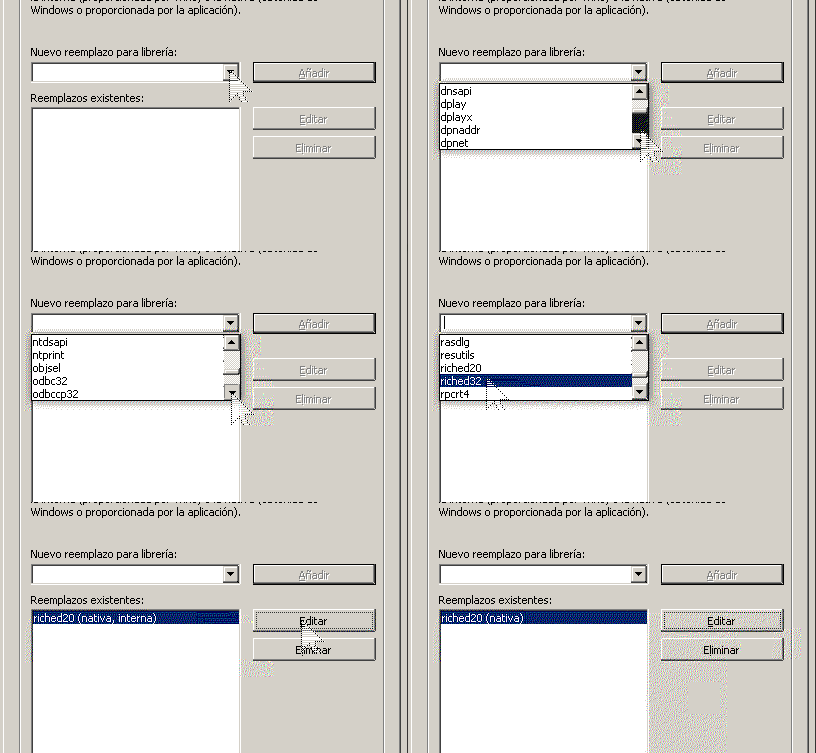
From this moment we can install Office 2007, but PowerPoint would have a problem so we have to add the riched20 library as Native (Windows)
PlayOnLinux
Assistants should not always be ruled out, since on many occasions, they avoid headache complications. If you want to do it in a simple way, simply install PlayOnLinux:
For Squeeze:
# wget -q “http://deb.playonlinux.com/public.gpg" -O- | apt-key add -
# wget http://deb.playonlinux.com/playonlinux_squeeze.list -O /etc/apt/sources.list.d/playonlinux.list
For Lenny
# wget -q “http://deb.playonlinux.com/public.gpg" -O- | apt-key add -
# wget http://deb.playonlinux.com/playonlinux_lenny.list -O /etc/apt/sources.list.d/playonlinux.list
For Etch:
# wget -q “http://deb.playonlinux.com/public.gpg" -O- | apt-key add -
# wget http://deb.playonlinux.com/playonlinux_etch.list -O /etc/apt/sources.list.d/playonlinux.list
Once the repositories are updated, we install PlayOnLinux
apt-get update apt-get install playonlinux
And now there is something as simple as the following:
If you have already moved to 2010, you can follow the steps in this video